Track Notes Legacy
A simple AU/VST plugin for keeping session and track notes inside your DAW.
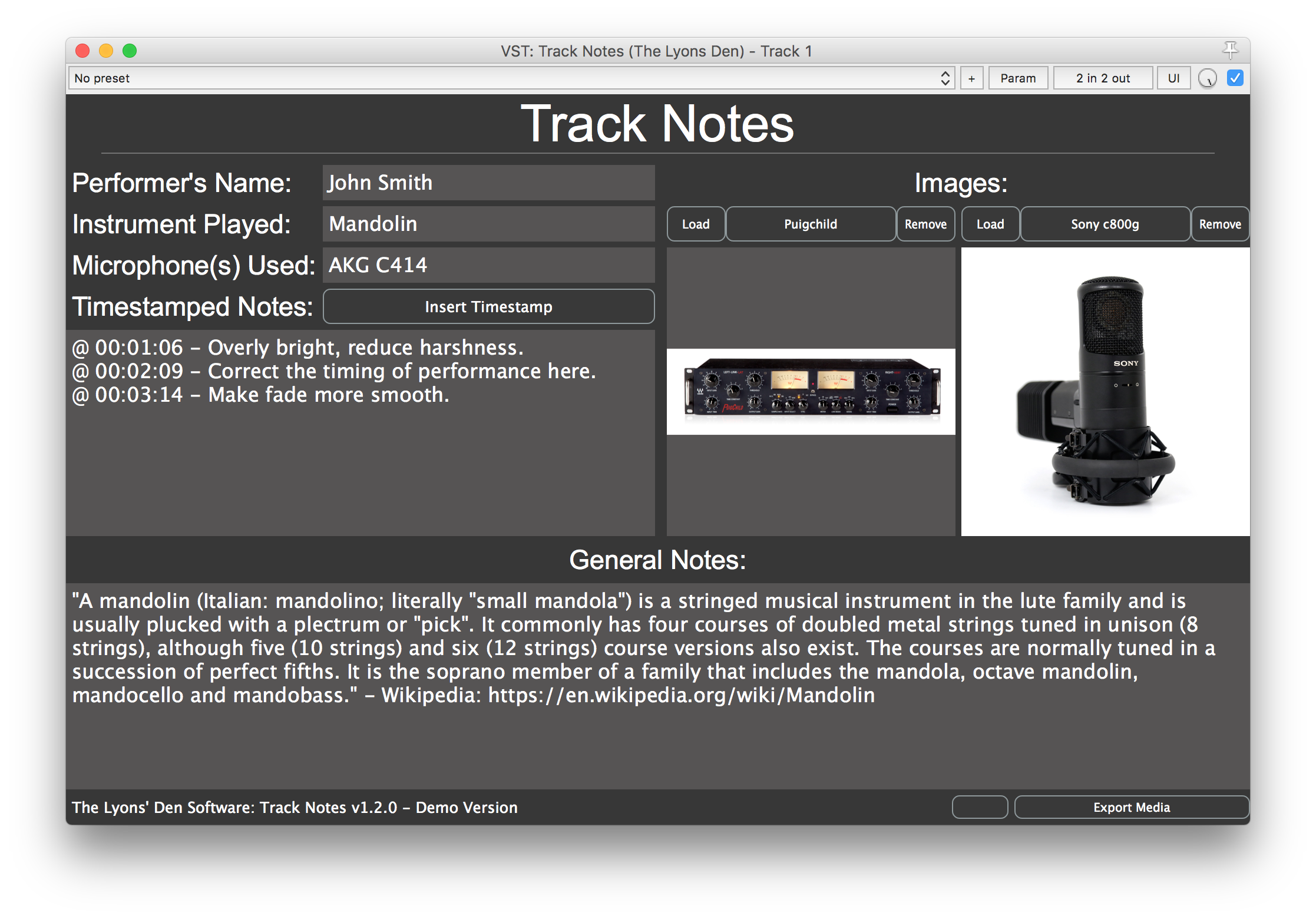
Track Notes is a legacy plugin and is no longer actively maintained. The download below is the demo build; the full source remains open under GPLv3.
Track Notes is a simple AU/VST plugin for keeping your session and track notes right inside your DAW - performer names, instruments, microphones, timestamped notes, and general notes, all attached to your project.
Features
- Text fields for Performer's Name, Instrument Played, Microphone(s) Used, Timestamped Notes, and General Notes.
- The first three labels are user-renameable.
- An Insert Timestamp button captures notes against the playhead position, in DAWs that expose playhead info.
- Load up to two images into the plugin, with at-a-glance previews and larger pop-out windows.
- Export all text notes to a
.txtfile and copy any loaded images into a folder of your choosing. - Stealth Mode hides Timestamped and General notes (and disables Insert Timestamp) for when you'd rather not show clients your notes.
Supported formats
- macOS 10.6+ (64-bit): VST, AU
- Windows (64-bit): VST
Download
Release notes
- PC VST builds are now available
- Stealth mode feature is added
- Corrected tabbing behaviour: Now, when a text editor is in focus, pressing the tab key will move the focus to the next sequential text editor.
- Demo version now available
Previous versions
Release notes
Bug fix: Some images load and display larger than they really are. Images that have dimensions that exceed those of the screen you are using will be scaled down (only the copy of the image loaded into the application is changed, not the original). This is sort of guesswork, as its hard to know the exact dimensions of the docks/taskbars/etc, but it SHOULD work. Also, images that don't exceed the desktop dimensions are not changed. Reworked the entire GUI to allow for image previews. You can still open the image in a larger window as before, but now you have "at a glance" views of either loaded image Added support to allow the first three labels to be renameable by the user The windows that house the images can no longer be maximized, in an effort to some keep DAWs from crashing. This doesn't affect anything, since the images didn't previously scale when the window changed sized *Blank image windows now load in the center of the screen, the same as windows with images in them
Release notes
- Fixed formatting issue with timestamps that included times above 60 minutes.
- Images now load in the center of the screen, instead of the upper left-hand corner.
- Changed the location, in the code, of where the method that calls the timestamping is located to hopefully increase the stability of the plugin and maybe fix some of the timestamping failures in some DAWs, but this comes with an ever-so-slight increase in CPU (Ex. 16 instances causes a 0.1 percent increase in CPU on my Macbook Pro 2.8 gHz i7 quad core).
Release notes
First release of Track Notes Plugin. For information about the plugin, purchase information, licensing, known issues, and future plans, reference the read me.
Free and open source - view the code on GitHub →